
Auto-Generate PDFs with n8n – Certificates, Reports & More [2026]
Manually creating certificates for 200 course participants? Or build a workflow once and never think about it again. n8n* + stencil makes it possible.
What you can automate with this workflow
Info: The ready-made workflow uses certificates as an example – the logic works for any type of PDF.
What you need
- n8n instance (self-hosted or cloud)*
- Free stencil account
- Google account (Sheets + Drive)
- Outlook/Microsoft 365 for email delivery
Don’t have n8n yet? The open-source workflow tool is available as a cloud version or self-hosted.
Try n8n for freeHow the workflow works
Trigger
New row in Google Sheets (manual, via form, or webhook)
Generate PDF
Call stencil API with data from the row
Save
Store PDF in Google Drive folder
Send
Email with PDF attachment to participant
Document
Update Sheet with file link and timestamp
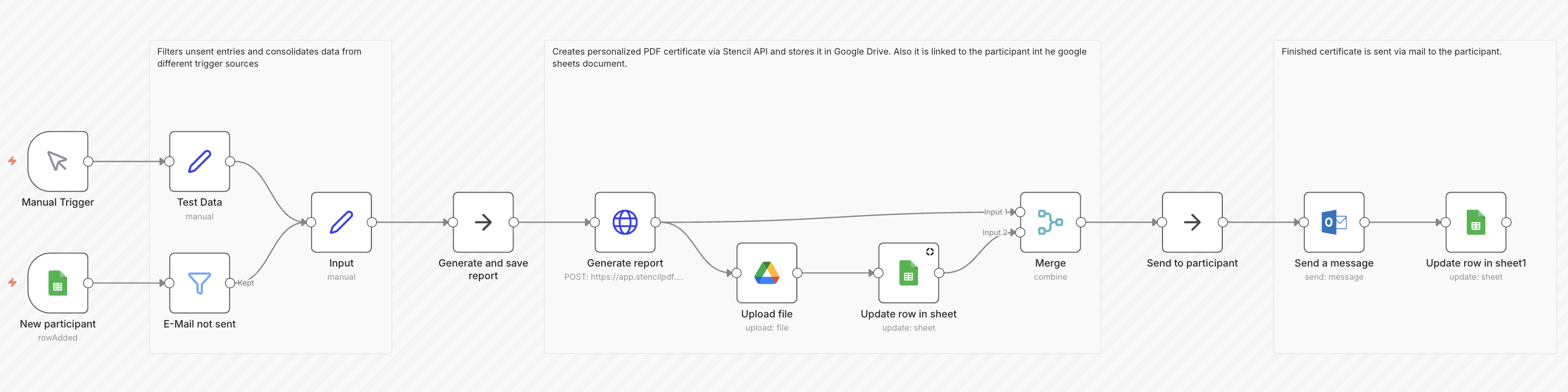
The finished workflow in n8n: From a Google Sheet row to a sent email with PDF attachment
Step-by-step: Setting up the workflow
1. Import the workflow template
- Click the link to the ready-made template and select “Use for free” in n8n.
- Alternatively: Download the JSON export and import it manually.
Tip: You need an n8n account. If you don’t have one yet:
Register here2. Create a stencil template
- Create an account on stencilpdf.com
- Create a new template (or use an existing one)
- Define placeholders: {{name}}, {{courseName}}, {{date}}, {{trainer}}
- Customize design: logo, signature, border
- Copy template ID and API key
3. Prepare your Google Sheet
- Create columns: Name, Email, Course Name, Date (later: PDF Link, Sent At)
- Column names must exactly match the workflow variables
| Name | Course Name | Date | |
|---|---|---|---|
| John Smith | john@example.com | React Basics | Jan 15, 2026 |
| Jane Doe | jane@example.com | React Basics | Jan 15, 2026 |
| Tom Wilson | tom@example.com | TypeScript Pro | Jan 22, 2026 |
4. Connect credentials
- Google Sheets + Drive: OAuth flow in n8n
- Microsoft Outlook: OAuth flow or App Password
- stencil API: Bearer token under Settings → API Keys
Tip: Test all credentials before activating the workflow.
5. Customize the workflow
- Enter template ID in the HTTP Request node
- Adjust Google Sheet ID and range
- Personalize email text
- Select Drive folder
{
  "template_id": "tpl_YOUR_ID",
  "variables": {
    "name": "{{ $json.name }}",
    "courseName": "{{ $json.courseName }}",
    "date": "{{ $json.date }}",
    "trainer": "{{ $json.trainer }}"
  }
}
6. Test and activate
- Add a test row in your Google Sheet
- Run the workflow manually
- Check: PDF in Drive? Email received? Sheet updated?
- Activate the workflow (toggle in the top right)
Extend the workflow
Other email providers
Gmail Node, SMTP, SendGrid
Other data sources
Airtable, Notion, Webhook, Database
Batch processing
Loop over all rows without a “Sent” date
Conditional logic
Different templates per course type (IF Node)
Additional storage
Dropbox, S3, Slack channel
Common problems and solutions
Problem
API returns 401
Solution
Check API key, don’t forget the “Bearer ” prefix
Problem
PDF is empty
Solution
Match variable names in stencil and Sheet
Problem
Email lands in spam
Solution
Set up SPF/DKIM for your domain
Problem
Workflow doesn’t run automatically
Solution
Workflow activated? Trigger correct?
Problem
Google auth expires
Solution
Reconnect credentials in n8n
Problem
Special characters broken
Solution
Ensure UTF-8 encoding
Use case examples beyond certificates
| Use Case | Trigger | Data Source | Output |
|---|---|---|---|
| Course certificates | New Sheet row | Google Sheets | Email + Drive |
| Monthly reports | Schedule (1st of month) | Database/API | Email to client |
| Invoices | Webhook (order) | Shop API | Email + Accounting |
| Proposals | CRM trigger | HubSpot/Pipedrive | Email to lead |
| Employment contracts | HR tool webhook | Personio/BambooHR | Email + Archive |
Alternatives compared
Manual (Canva/Word)
Works for 5 certificates, not for 500
Google Docs + Apps Script
Free, but complex scripting required
Zapier + PDF.co
Expensive at volume, less control
Make + DocuSign
Overkill for simple PDFs
For one-off tasks, manual is fine. For recurring batches or event-triggered PDFs, automation pays off.
Frequently asked questions
Workflow live in 10 minutes
The ready-made n8n workflow is waiting for you. Import, connect credentials, customize your template – done. Never create PDFs manually again.
Don’t have n8n yet? Get started for free
* This article contains affiliate links to n8n. If you sign up through our link, we receive a small commission – at no extra cost to you. We only recommend tools we use ourselves and believe in.

Author
stencil Team
We help businesses automate repetitive document work. From certificates to invoices – with stencil, every PDF becomes an API call.